Complete Labelling Solution

One device. No tablet. No extra hardware.

One terminal.
Every label.
Offline through service.

LabelFood Printer SV2 replaces your tablet, scanner, printer, and clipboards. Compliant Natasha's Law labels with all 14 allergens in bold. Keeps printing when the Wi-Fi drops. Every label audit-ready.

Natasha's Law compliant
No extra hardware needed
EHO-ready audit trail
Infinite warranty
Built & supported in the United Kingdom
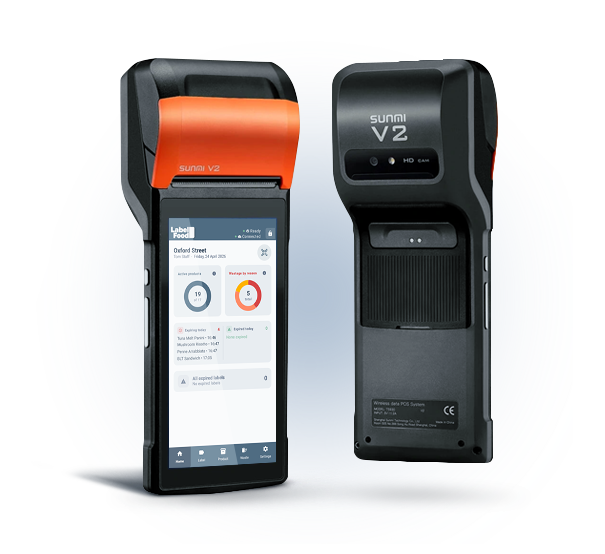
LabelFood Printer SV2 — Home screen of the all-in-one food labelling terminal

How it works

Up and running in minutes

No technical knowledge required. The device arrives ready to use; you set it up once and your kitchen labels itself.

1

Pair your device

Unbox the device, connect to your kitchen WiFi, and pair it with your LabelFood account in seconds.

One device pairs to one branch. Scales from 1 device to 100+ across multiple locations, all managed from a single dashboard.

2

Add your products

Build your catalogue the way that suits you: one product at a time, several row by row, an Excel import, or let AI read your existing menu and draft the list for you.

AI reads photos and PDFs of your menu, or a single product label, and fills the fields in — you review everything before it saves. Allergens are set per product. Natasha's Law compliant from day one.

3

Monitor from anywhere

Track label prints, waste records, and staff activity from the cloud dashboard, on any device, from anywhere.

Real-time expiry alerts per product (name + HH:mm). Scales to 100+ locations. Full activity log exported for EHO inspections.

4

Print a compliant label

Pick quantity, set expiry, and print. Allergens are bolded automatically. Label is ready in seconds.

1

Pick quantity

One label or a full batch in a single job.

2

Set expiry date

Pre-filled from the product shelf life; adjust if needed.

3

Print label

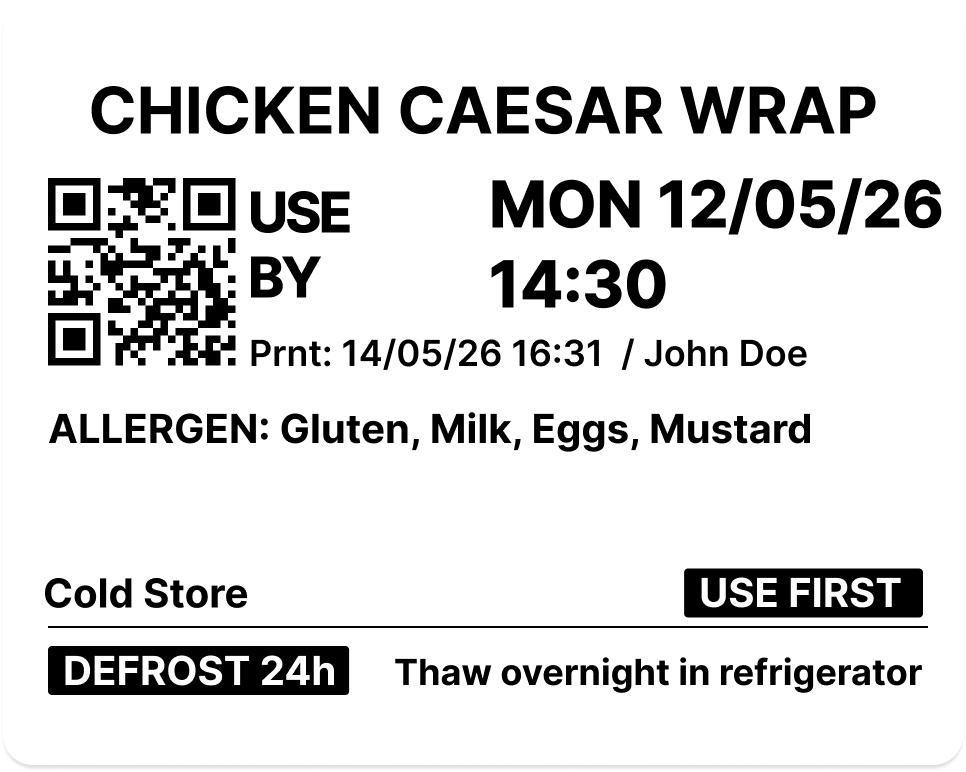
Allergens in bold, QR code on every label.

5

Scan a barcode

Kitchen staff open the app, scan a product barcode. The system instantly pulls up your pre-configured product label.

Batch scan mode: scan multiple barcodes in quick succession, then record waste for all at once.

6

Record waste

Finished a product? Scan and record the waste with a reason and optional photo. Batch scan available for end-of-service.

Waste data syncs to the cloud; see exactly where food is being wasted and why. Full audit trail: every action timestamped.

Printed vs handwritten

A label costs under 1p.
Handwriting it costs
hours every week.

Handwriting looks free. But writing out the product name, date and allergens on every single container costs hours of paid kitchen time every week.

Handwriting doesn't save money. It just moves the cost into wages.

A kitchen container labelled half by hand and half with a LabelFood printed label — the handwritten side smudged, the printed side showing product name, use-by date and allergens

EHO & Food Hygiene Rating

Ready before the inspector walks in

An inspector asks for evidence, not explanations. Your rating is scored on three things, and one of them is simply whether you can prove what your kitchen did.

1

Hygienic food handling

Preparation, cooling, storage, date labelling and stock rotation.

LabelFood evidences this
2

Cleanliness of the premises

The building, the equipment and the layout. Down to you alone.

Not something software can fix
3

Management of food safety

Your systems, checks and written records. Where most points are lost.

LabelFood evidences this

What the inspector asks — and what you already have

When was this prepared, and when does it expire?

Printed on the label and kept in your dashboard. Expiry comes from the product's shelf life, never guessed.

Who labelled this?

Every print is attributed to the staff member signed in on the device at the time.

What did you throw away, and why?

Waste records carry a reason, optional notes and a photo, broken down by cause.

Show me the last three months.

The Compliance Pack covers 7, 30 or 90 days and exports as one branded PDF.

Nothing to prepare the night before an inspection. The records build themselves.

See what an inspection asks for

Now Available on iOS & Android

Your kitchen in your pocket

The LabelFood mobile app gives every team member their own terminal. The one device in the kitchen is no longer the only place work can happen.

  • Manage products, devices, and reports from your phone
  • Staff prepare tasks from their phone, then print labels from the terminal
  • Push notifications for expiry, sync, and waste events
  • Real-time sync across device, app, and cloud dashboard

Official Label Rolls

Custom-made for the LabelFood Printer

Most kitchens try third-party rolls first. They jam, they tear on removal, and they don't hold in cold storage.

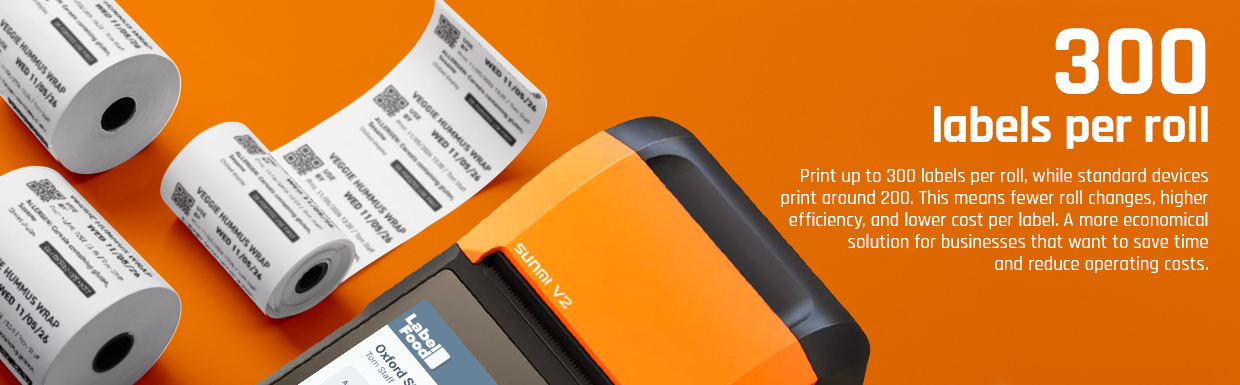
Our rolls are made specifically for the LabelFood Printer SV2 — tested in real kitchen conditions, with a removable adhesive that stays put in the freezer and peels cleanly every time. At 0.87p per label, they also cost significantly less than ordering custom labels from a supplier. See how the cost compares →

LabelFood label rolls

Stays readable all day

Print stays sharp in cold displays, fridges, and hot prep surfaces. No fading or smearing mid-service.

Loads and prints without fuss

Made to fit the LabelFood printer exactly. No jams, no mis-feeds, no wasted labels.

How our rolls compare

LabelFood Third-party
Labels per roll 300 ~150–180
Cost per label
0.87p Best
~1.1p+
Adhesive Removable Permanent / unknown
Peels without tearing
Calibrated for SV2

Delivered to your kitchen

Order from your dashboard or device

Invoice included

Emailed automatically after each order

£2.60 per roll · 300 labels

0.87p per label

Allergen & Nutrition Labels

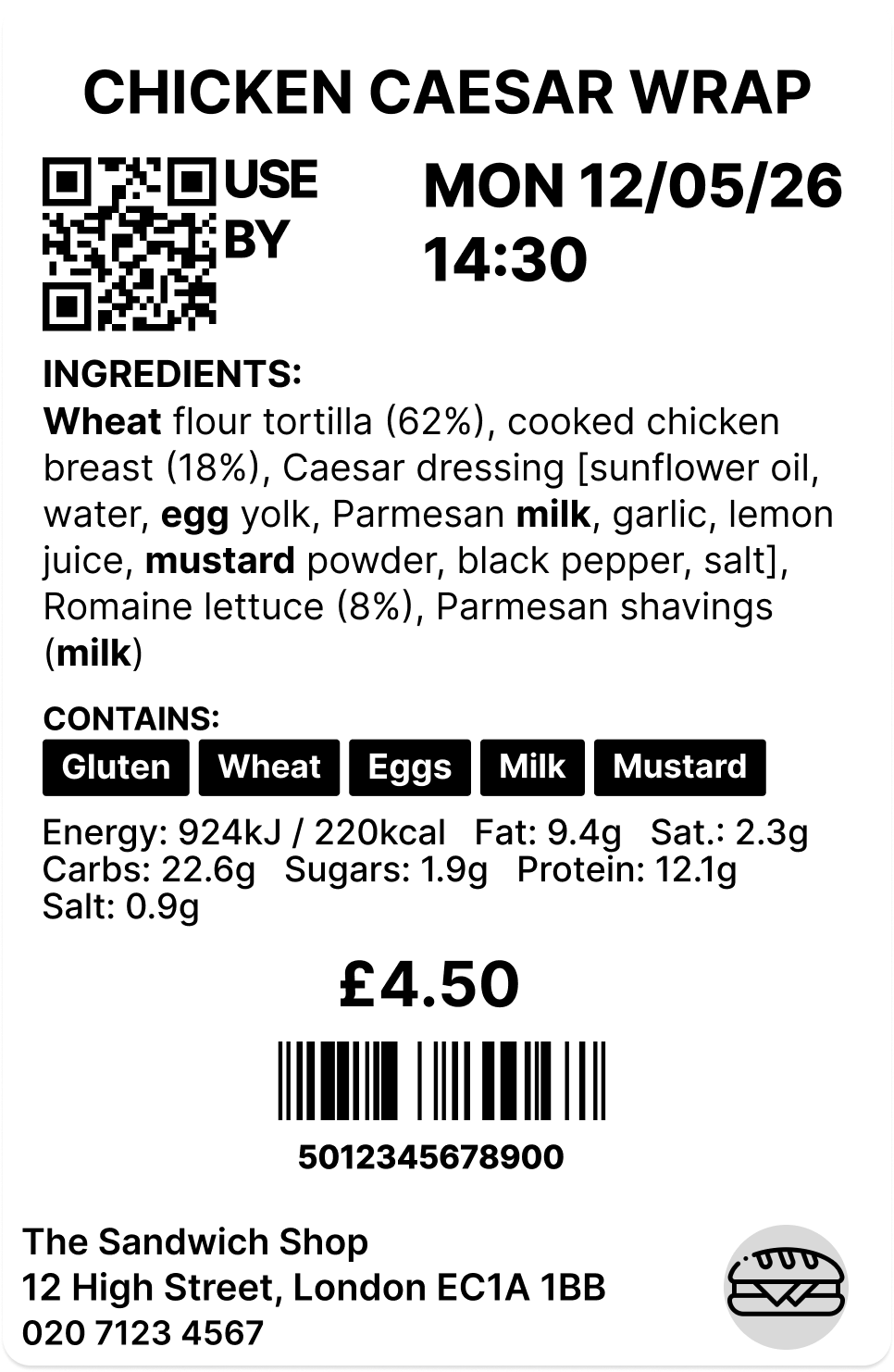
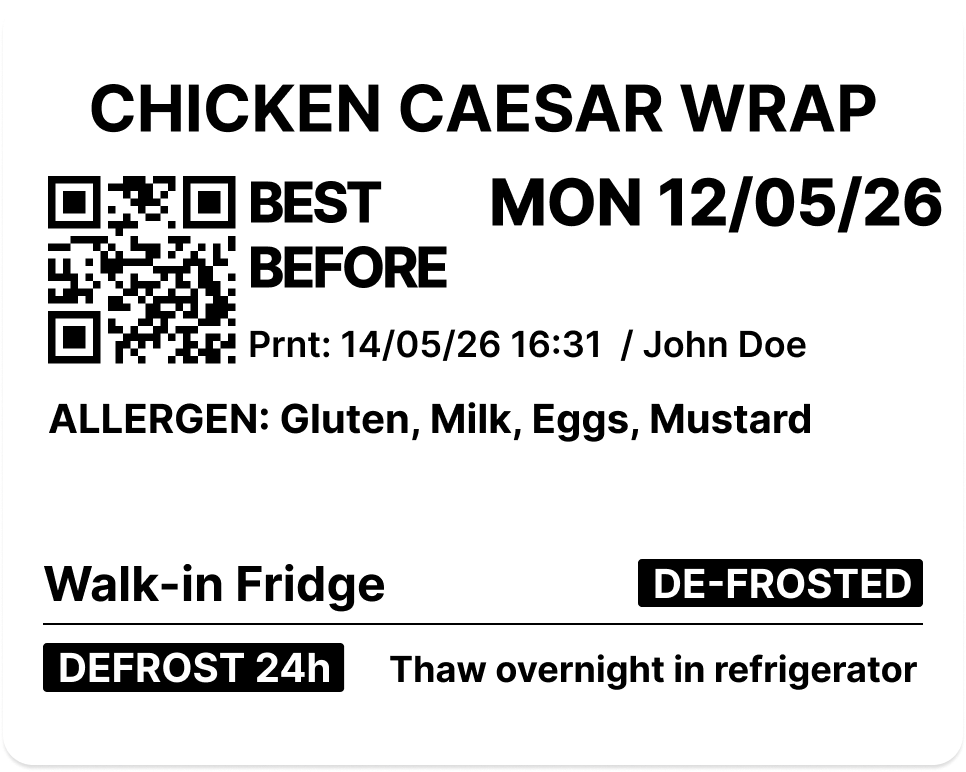
Print fully compliant allergen labels for all 14 UK allergens, highlighted in bold on every label. Natasha's Law (PPDS) compliant. Nutrition facts available on the Annual plan.

Allergens are set per product in the dashboard. The system won't let you print without them.

Real-time Label Tracking

Every label is tracked individually in the cloud with its exact expiry time. Unique QR code and label ID on every print; scan to retrieve instantly.

Dashboard shows live expiry status. Expiry alerts appear on the device home screen before labels actually expire so staff can act early.

Bulk & Batch Printing

Create bulk label jobs from the cloud dashboard: select products, set quantities, and the device prints all labels in sequence. Perfect for morning prep.

Batch scanning lets staff scan multiple barcodes in quick succession and log waste for all of them at once with a single reason and note.

Product Management

Manage your full product catalogue from the cloud dashboard. Set ingredients, allergens, storage conditions, and expiry rules per product.

Add products one at a time, row by row, or by Excel import — or let AI read photos and PDFs of your menu and build the list for you to review before saving.

Waste Tracking & Reports

Record waste from the device or dashboard: reason, notes, and photo. Dashboard analytics show waste breakdown by reason so you can spot patterns and reduce losses.

Label reports cover the last 90 days: total printed, live, expired, and removed labels. Essential for EHO inspections and compliance audits.

Prep & Sales Labels

Some products go straight to the shelf. Others are made fresh each service. LabelFood handles both.

Prep labels carry full allergen information, Natasha's Law compliant by default. Sales labels follow a separate flow for retail or display items. Set the type once per product; the device applies the right format automatically.

Blog

Guides & Compliance Resources

Practical guides on Natasha's Law, PPDS compliance, and food labelling for UK food businesses.

Natasha's Law Printer Solutions

Natasha's Law Printer Guide for UK Commercial Kitchens

A guide to Natasha's Law printer solutions for UK kitchens. Learn to automate allergen labelling for PPDS food, reduce prep time, and maintain audit-ready re...

Read article →
Commercial Kitchen Label Printer

Choosing a Commercial Kitchen Label Printer: A Professional Guide

Find the right commercial kitchen label printer for your UK business. Our guide helps you meet Natasha's Law, manage allergens, and improve EHO inspections.

Read article →
Food Storage Label Printer

Food Storage Label Printer: Professional Solutions for UK Kitchens

A professional food storage label printer helps UK kitchens reduce waste and manage allergen labelling. Learn how to meet regulations and improve operational...

Read article →
Takeaway Food Labeling System

Takeaway Food Labelling: 2026 Guide for UK Kitchens

Our 2026 guide to a digital takeaway food labeling system helps UK kitchens manage allergens, comply with Natasha's Law, and reduce food waste.

Read article →
Food Waste Log Software

Food Waste Log Software: Professional Guide for UK Kitchens

A guide to food waste log software for UK kitchens. Reduce waste costs, maintain audit-ready records, and improve staff accountability with a digital system.

Read article →
Digital HACCP Food Labels

Digital HACCP Food Labels: A Guide to Professional Kitchen Compliance

Move beyond manual day dots with digital HACCP food labels. This guide explains UK allergen laws, Natasha's Law, and how to prepare for EHO inspections.

Read article →

FAQ

Frequently Asked Questions

Everything you need to know about LabelFood

Product & How It Works

LabelFood is a standalone all-in-one labelling terminal. The LabelFood Printer SV2 has its own touchscreen, barcode scanner, and thermal printer built in. No tablet or phone needed. Kitchen staff scan barcodes and print labels directly from the device. Works fully offline; no internet required to print or record waste. The cloud dashboard lets you manage products, monitor activity, and generate reports from anywhere.
No. The LabelFood device works fully offline. It doesn't need an internet connection, WiFi, or 4G to print labels, scan barcodes, or record waste. When connectivity is available, data syncs to the cloud so you can monitor everything from your phone, tablet, or desktop.
Absolutely. LabelFood is designed for all types of food businesses: restaurants, cafés, bakeries, food manufacturers, catering companies, and meal prep services. QR code labels let customers scan and see full allergen info instantly.
LabelFood is built to scale from 1 location to 100+. Each branch has its own products, devices, staff, and waste reasons, all managed from a single cloud dashboard. You control everything: add branches, assign devices, set staff permissions, and monitor activity across your entire operation from one place. Products can be shared across all branches or customised per location.
Contact our support team and we'll get you back up and running as quickly as possible. We want to keep your kitchen running with minimal downtime.

Compliance & Allergens

Yes. LabelFood is built to support the key UK food labelling laws: Natasha's Law (PPDS allergen labelling), the Food Information Regulations 2014 (England), and the retained EU Regulation 1169/2011 (FIC). Labels cover all 14 allergens in bold, full ingredient lists, use-by and best-before dates, and nutrition information. For the full regulatory overview, see the Food Standards Agency guidance on packaging and labelling.
Natasha's Law (Food Information Amendment 2019) requires all UK food businesses to clearly display all 14 allergens on every food item that is pre-packed for direct sale (PPDS). This applies to any food you prepare on-site and package before a customer orders it: sandwiches, salads, baked goods, meal deals. If you're unsure whether PPDS applies to you, the safest rule is: if you wrap it before selling it, it needs a label. See the FSA's introduction to PPDS allergen labelling for full guidance.
The 14 allergens are: celery, cereals containing gluten, crustaceans, eggs, fish, lupin, milk, molluscs, mustard, nuts, peanuts, sesame, soybeans, and sulphur dioxide. Under Natasha's Law, all allergens present in a food must be clearly visible on the label and highlighted in bold or underlined so customers can spot them instantly. Even trace amounts count.
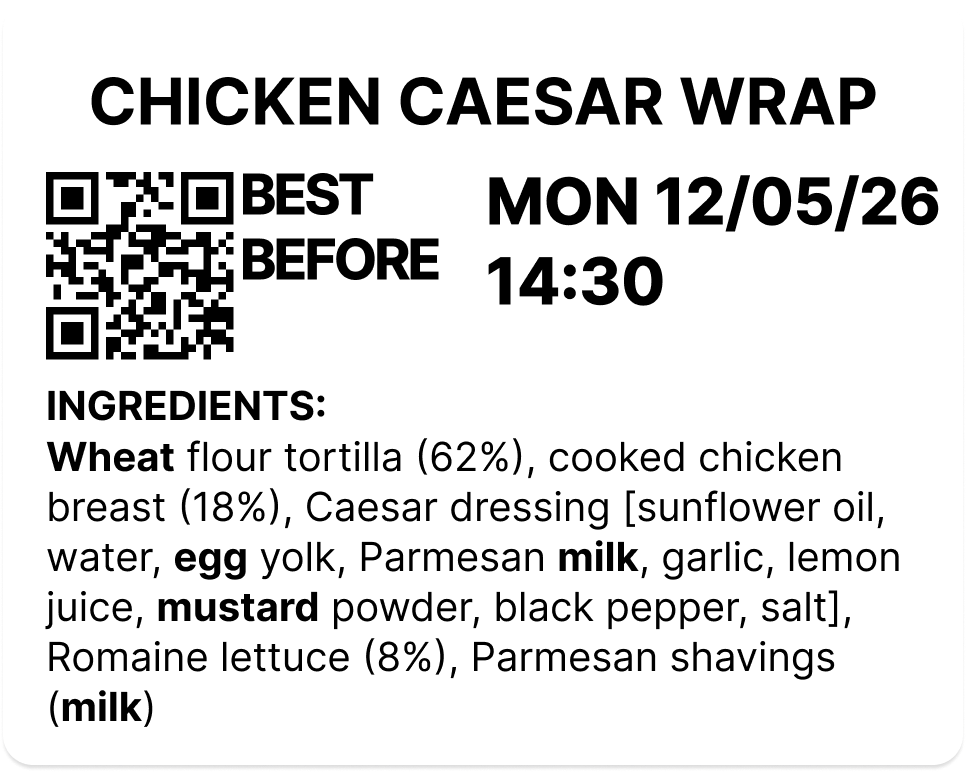
When you add a product to your LabelFood catalogue, you select its allergens from the full 14-list. When staff print a label, all allergens are printed in bold automatically. Each label shows: product name, full allergen list (highlighted), use-by date, batch code, and QR code. The system requires allergens to be set before a label can be printed.
All 14 major allergens required by UK law: celery, cereals containing gluten, crustaceans, eggs, fish, lupin, milk, molluscs, mustard, nuts, peanuts, sesame, soybeans, and sulphur dioxide. Allergens are highlighted on every printed label.
Yes. Under the Food Information Regulations 2014 and EU Regulation 1169/2011, prepacked food must declare energy (kJ and kcal), fat, saturated fat, carbohydrates, sugars, protein, and salt. LabelFood supports all 8 fields via custom fields on each product; they print directly on the label alongside allergens and dates. The fields are pre-configured as defaults so you can fill them in when adding each product. For the full nutrition labelling requirements, see the FSA nutrition labelling guidance.

Labels & Printing

The device supports four label sizes: 57×40 mm, 50×60 mm, 50×40 mm, and 50×30 mm. Choose the right size for your kitchen, from small prep labels to larger ingredient labels. No extra cost for any size.
Yes. When printing, staff can toggle "Use First" on any label. This marks the item as the oldest stock, the one to be used before newer batches. The label prints with a clear "Use First" indicator so kitchen staff know which item to reach for without guessing. No separate sticker or manual marking needed.
Yes. When printing a label for a defrosted product, staff toggle "Defrosted" on the print screen. The label prints with the defrosted date alongside the use-by date, so staff always know when an item was taken out of the freezer and when it must be used. No separate label required.
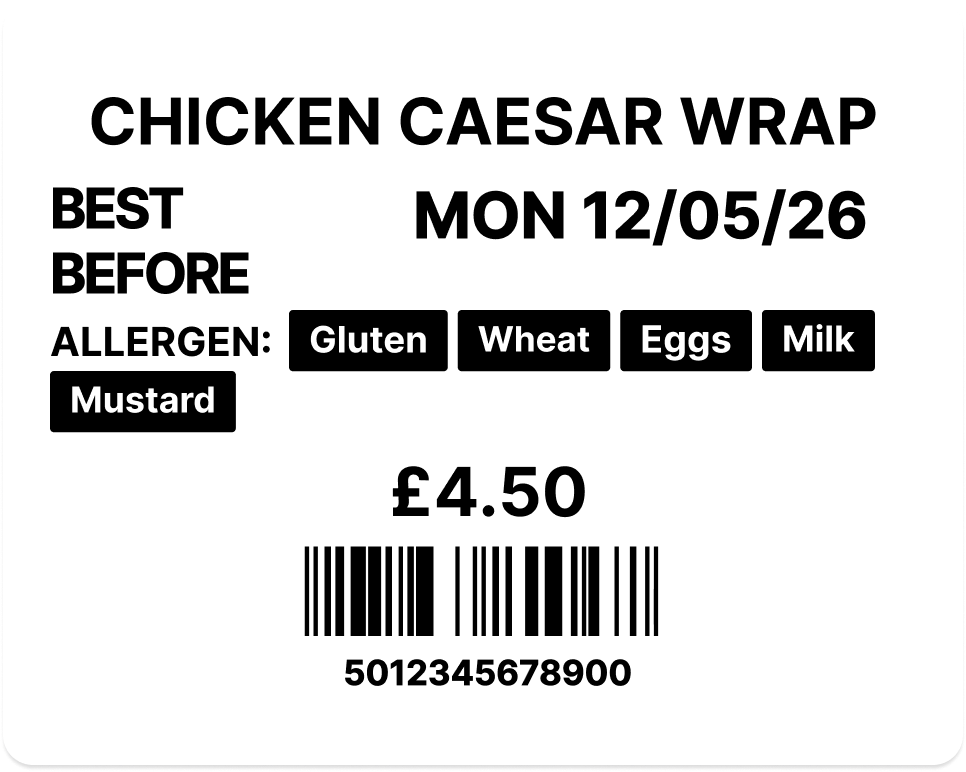
Yes. Each product can be configured to display either a use-by or best-before date, set once in the dashboard per product. Use-by is the default for most kitchen-prepared food (PPDS). Best-before is available for products where quality rather than safety governs the date. The device applies the correct date type automatically when staff print.
Create a bulk label print job from the cloud dashboard: select products and set quantities. The job appears on the device as a pending bulk job. Staff tap Print and the device prints all labels in sequence. Perfect for morning prep when you need dozens of labels at once.
Yes. Products are set as Prep or Sales in the dashboard. Prep products are your kitchen-made items; labels carry the full 14-allergen list in bold, Natasha's Law compliant by default. Sales products are retail or display items that follow a separate label format. The device automatically applies the correct label type when staff print. One device handles both with no extra hardware or systems needed.
Order directly from the cloud dashboard. Go to Consumables, set the quantity for each item, and pay securely. Orders are delivered to your address with tracking available.
Yes. The Reports page in the cloud dashboard shows all label activity for the last 90 days. See total labels printed, live labels, expired labels, and removed labels. Search by product name and paginate through results. Essential for EHO inspections and compliance audits.

Dashboard & Management

There are several ways, so you can pick whichever suits the size of your menu. Add products one at a time, add several row by row, or import an Excel file. If you would rather not type anything, upload photos or PDFs of your existing menu and AI reads them and extracts a product list for you. AI can also fill in a single product from a photo of its label, reading the name, barcode, allergens, ingredients and dates. Everything AI produces is shown to you for review and editing before it is saved, and nothing goes live until you confirm it. You can also export your whole catalogue to Excel, edit it, and upload it again to update products in bulk.
Every action on the device is logged locally and synced to the cloud: print events, barcode scans, waste records, sync status, and device events. Every label printed, every waste event recorded, every staff action timestamped. Available from the dashboard or on the device itself. You can export the full audit trail for EHO inspections.
When staff submit new product requests or request clearance of expired labels from the device, they appear on the Requests page in the dashboard. Managers review and approve product requests (with photos) and clearance requests. This ensures manager oversight before new products are added or expired labels are bulk-removed.
Yes. LabelFood is built to scale from 1 location to 100+. Each branch has its own products, devices, staff, and waste reasons, all managed from a single cloud dashboard. Add branches, assign devices, set staff permissions, and monitor activity across your entire operation from one place. Products can be shared across all branches or customised per location.
Yes. Three reports export to PDF directly from the cloud dashboard, each branded with your organisation and branch. The Compliance Pack is the one built for EHO inspections: choose 7, 30 or 90 days and it combines label discipline, your wastage log broken down by reason, and allergen coverage into a single due-diligence summary. The Label Report covers the last 90 days in detail (total printed, live, expired and removed), and the Staff Activity report shows print activity per team member.

Features & Account

Yes. Batch scan mode lets you scan multiple barcodes in quick succession, building a list on the device. When you're done scanning, tap Continue and record waste for all items at once with a single reason and note. Perfect for end-of-service waste logging. One reason applies to all scanned items, saving minutes of repetitive work.
We offer flexible monthly and annual plans. Both include the device, USB-C cable, demo label rolls, unlimited labels, and unlimited products. 14-day free trial with free returns. Visit our pricing page for the latest plan details.
Yes, cancel anytime with no penalties. You keep access until the end of your billing period. Return the device within 14 days of your trial ending and pay nothing.

Still have questions? Get in touch — we reply within 24 hours.